#include <SDL3/SDL.h>
#include "rcut_sdl.h"

static bool quit;

static void on_ok(void)
{
    quit = true;
}

int main(void)
{
    r_sdl_frontend* f = r_sdl_init("rcut tutorial", 320, 150, 0);
    if(!f) return 1;
    r_ui_list* ui = f->root;

    rect ok = { 110, 75, 100, 50, .id = 2 };
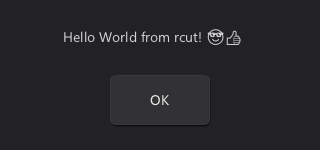
    r_label(ui, (rect){ 63, 0, 194, 75, .id = 1 }, "Hello World from rcut! 😎👍");
    r_button(ui, ok, "OK");
    r_on_click(ui, ok, on_ok);

    while(!quit && !r_sdl_quit_requested(f, true))
    {
        SDL_Event e;
        SDL_WaitEventTimeout(NULL, 5); // Optional, reduces CPU usage.
        while(SDL_PollEvent(&e))
            r_sdl_process_event(f, &e);

        r_sdl_update(f);
        r_sdl_render_ui(f);
    }
    r_sdl_free(f);
    return 0;
}
Everything in rcut is a rectangle: rect is x, y, w, h plus an id. UI elements are rectangles appended to a UI list (r_ui_list), there are no widget objects. r_button appends a drawable (something with a style that gets rendered) and an interactable (something that receives input) for the given rect. r_on_click attaches a callback to the interactable with the same rect. That is how the two calls belong together: the button and its action are separate entries in the list, connected only through the rect's ID.
IDs identify elements across rebuilds of a list, they have to be unique within a list. Here they are assigned by hand, in the following chapters they are derived automatically.
rcut is split into three modules:
f->root is its UI list), translates SDL events (r_sdl_process_event), runs timers (r_sdl_update) and presents the result (r_sdl_render_ui).rcut is not immediate mode. The UI above is built once before the loop, the loop only forwards events and renders. Rendering only redraws what changed, so an idle UI costs next to nothing.
static float    brightness = 0.5f;
static float    db = -6;
static uint32_t mode = 0644;

static float get_gain(void)
{
    return db <= -60 ? 0 : powf(10, db / 20);
}

static void set_gain(float gain)
{
    db = gain > 0.001f ? 20 * log10f(gain) : -60;
}

// [...] in main:
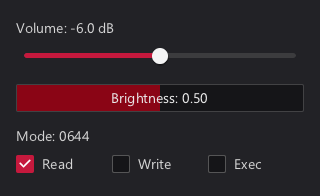
r_label_value(ui, (rect){ 16, 16, 288, 24, .id = 1 }, "Volume: %.1f dB", R_PTR(&db));
r_slider_h(ui, (rect){ 16, 44, 288, 24, .id = 2 }, 0, 1, 0.01f, R_GETSET(.getter_f32 = get_gain, .setter_f32 = set_gain));
r_slider_box(ui, (rect){ 16, 84, 288, 28, .id = 3 }, "Brightness", 0, 1, 0.01f, R_PTR(&brightness));
r_label_value(ui, (rect){ 16, 124, 288, 24, .id = 4 }, "Mode: %04o", R_PTR(&mode));
r_checkbox(ui, (rect){  16, 152,  90, 24, .id = 5 }, "Read",  R_BITFIELD(&mode, 5, 1));
r_checkbox(ui, (rect){ 112, 152,  90, 24, .id = 6 }, "Write", R_BITFIELD(&mode, 4, 1));
r_checkbox(ui, (rect){ 208, 152,  96, 24, .id = 7 }, "Exec",  R_BITFIELD(&mode, 3, 1));
Widgets don't own their values, they are bound to your data. There are three kinds of bindings:
R_PTR(&var): reads and writes var directly. The type is detected automatically, bool, all integer types, float and double work.R_BITFIELD(&var, offset, length): binds length bits of an integer, starting at bit offset. Here each checkbox toggles one permission bit of mode.R_GETSET(...): goes through functions. The slider works with a linear gain from 0 to 1, while the program stores decibels. The getter and setter convert between the two.Bound values are read every time the UI is drawn. Moving the slider changes db through set_gain, and the label bound to db shows the new value on its own. No rebuild and no manual synchronization is needed, this also applies if the program changes the variables itself.
r_label_value takes a printf format with a single conversion, the value is converted to whatever the conversion expects.
static struct { char* name; float db; bool mute; } channels[] = {
    { "Master",  -6 },
    { "Music",   -12 },
    { "Voice",   0 },
    { "Effects", -18, true },
};

// [...] in main:
r_layout_iter window = r_stack(ui, r_shrink(ui->root_area, 16), R_BOTTOM);
rect footer = r_next(&window, 32);
r_layout_iter strips = r_stack(ui, r_remaining(&window), R_LEFT);
for(int i = 0; i < 4; i++)
{
    r_layout_iter strip = r_stack(ui, r_next_fraction(&strips, 1.0f / (4 - i)), R_TOP);
    r_label      (ui, r_next(&strip, 24), channels[i].name);
    r_checkbox   (ui, r_next(&strip, 24), "Mute", R_PTR(&channels[i].mute));
    r_label_value(ui, r_next(&strip, 24), "%.1f dB", R_PTR(&channels[i].db));
    r_slider_v   (ui, r_remaining(&strip), -60, 0, 0.1f, R_PTR(&channels[i].db));
}
rect ok = r_aligned(R_RIGHT, footer, (rect){ .w = 100, .h = 32 });
r_button(ui, ok, "OK");
r_on_click(ui, ok, on_ok);
Placing every rect by hand doesn't scale. A layout iterator takes an area and hands out consecutive rects from it:
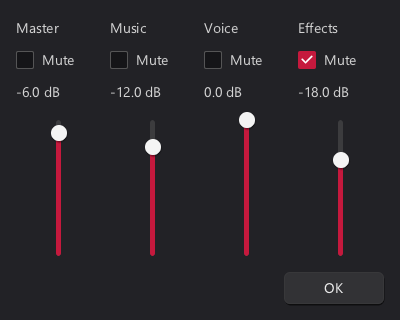
r_stack(ui, area, dir) starts an iterator. dir is the side it cuts from: R_TOP goes downwards, R_LEFT left to right, R_BOTTOM and R_RIGHT start at the opposite end.r_next(&it, size) returns the next size pixels, with spacing between consecutive elements.r_next_fraction(&it, f) returns a fraction of the remaining space. 1.0f / (n - i) in a loop gives n equal parts.r_remaining(&it) returns everything that is left.Iterators are nested by using a rect of one as the area of another. Here the window is split into a footer and the area above it, which is split into four channel strips, each one stacked vertically.
r_shrink returns a rect with a margin removed, r_aligned places a rect of a given size inside another one, here the OK button at the right of the footer.
None of these rects has an ID set by hand. Every function that derives a rect from another derives the ID as well: the ID of a rect from r_next depends on the start area of the iterator and the element's index. As long as the same code runs in the same order, the IDs stay the same.
// This is a build function, which is very common in rcut codebases.
// You will often have multiple of these, like build_exit_dialog or build_main_window.
static void build(r_ui_list* ui)
{
    r_list_clear(ui);
    r_layout_iter window = r_stack(ui, r_shrink(ui->root_area, 16), R_BOTTOM);
    // [...] same as in 1.2
}

int main(void)
{
    r_sdl_frontend* f = r_sdl_init("rcut tutorial", 400, 320, R_SDL_RESIZABLE);
    if(!f) return 1;
    r_ui_list* ui = f->root;

    while(!quit && !r_sdl_quit_requested(f, true))
    {
        SDL_Event e;
        SDL_WaitEventTimeout(NULL, 5);
        while(SDL_PollEvent(&e))
            r_sdl_process_event(f, &e);

        if(ui->resized) build(ui);
        r_sdl_update(f);
        r_sdl_render_ui(f);
    }
    r_sdl_free(f);
    return 0;
}
With R_SDL_RESIZABLE the window can be resized, but the layout from 1.2 was computed once for the initial size. Since all rects are derived from ui->root_area, adapting to a new size only means running the same code again.
The building code moves into a function that starts with r_list_clear, which empties the list. ui->resized is set when the window size changed (and initially), r_list_clear resets it.
Rebuilding doesn't lose state. The list keeps the previous build around while the new one is created, and elements are matched by ID: hover, focus, a dragged slider or the cursor of a text input carry over to the element with the same ID. This is why stable IDs matter.
Rebuild whenever the structure of the UI changes: the size changed, an element was added or removed, a different text is shown. Values shown through bindings don't need a rebuild.
static void build(r_ui_list* ui)
{
    r_list_clear(ui);
    rect main   = ui->root_area;
    rect menu   = r_cut_px(R_TOP,    &main, 32,  R_SALT00);
    rect status = r_cut_px(R_BOTTOM, &main, 24,  R_SALT01);
    rect side   = r_cut_px(R_LEFT,   &main, 140, R_SALT02);
    // main was modified by the r_cut_px calls and only contains the remaining area.

    r_panel(ui, menu,   R_STYLE_PANEL);
    r_panel(ui, status, R_STYLE_PANEL);
    r_panel(ui, side,   R_STYLE_PANEL);
    r_panel(ui, main,   R_STYLE_PANEL);
    r_label(ui, r_shrink_sides(menu,   8, 0, 8, 0), "Menu");
    r_label(ui, r_shrink_sides(status, 8, 0, 8, 0), "Status");
    r_label(ui, r_shrink_sides(side,   8, 0, 8, 0), "Side");
    r_label(ui, r_shrink_sides(main,   8, 0, 8, 0), "Main");
}
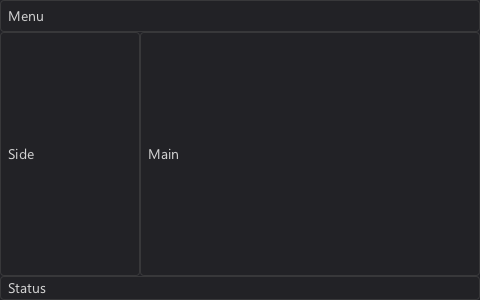
Rectangle cutting is what layout iterators are built on, and what gives rcut its name. r_cut_px(dir, &r, px, salt) cuts px pixels off the dir side of r, returns the cut off part and shrinks r to what is left. Successive cuts carve up an area piece by piece. r_cut_fraction does the same with a fraction of the current size.
The cut off parts need IDs of their own. They are derived from the ID of r and the salt, which only has to differ between cuts of the same rect. R_SALT00 to R_SALT20 are predefined for convenience, any number works.
Cutting is the natural fit for application layouts like this one: fixed size bars at the edges and a main area that takes the rest. Layout iterators are the better fit for sequences of similar elements.